What You'll Learn Today
In this lesson, we'll explore the fundamental ways computers represent and organize information. By the end, you'll understand:
- How computers use different number systems (binary, decimal, hexadecimal)
- The different types of data (integers, strings, booleans, etc.)
- How data is organized into structures (arrays, records, trees, files)
- Advanced algorithm strategies (divide and conquer, backtracking)
- Project management methodologies (Waterfall vs Agile)
- Design approaches and algorithm analysis techniques
Number Systems for Computing
Humans naturally use decimal (base-10) because we have 10 fingers. Computers use binary (base-2) because they only understand two states: ON (1) and OFF (0).
Understanding how to convert between number systems is essential for software engineering!
Binary (Base-2)
Binary uses only two digits: 0 and 1
Each position represents a power of 2:
| Position | Power of 2 | Value |
|---|---|---|
| 7th bit | 2⁷ | 128 |
| 6th bit | 2⁶ | 64 |
| 5th bit | 2⁵ | 32 |
| 4th bit | 2⁴ | 16 |
| 3rd bit | 2³ | 8 |
| 2nd bit | 2² | 4 |
| 1st bit | 2¹ | 2 |
| 0th bit | 2⁰ | 1 |
Binary: 10110101
Calculation:
- (1 × 128) + (0 × 64) + (1 × 32) + (1 × 16) + (0 × 8) + (1 × 4) + (0 × 2) + (1 × 1)
- 128 + 0 + 32 + 16 + 0 + 4 + 0 + 1
- = 181 in decimal
Hexadecimal (Base-16)
Hexadecimal uses 16 symbols: 0-9 and A-F (where A=10, B=11, C=12, D=13, E=14, F=15)
It's commonly used because it's a compact way to represent binary numbers!
| Decimal | Binary | Hexadecimal |
|---|---|---|
| 0 | 0000 | 0 |
| 1 | 0001 | 1 |
| 10 | 1010 | A |
| 15 | 1111 | F |
| 255 | 11111111 | FF |
Two's Complement (Representing Negative Numbers)
Computers use two's complement to represent negative integers in binary.
How it works:
- Write the positive number in binary
- Flip all the bits (0→1, 1→0)
- Add 1 to the result
- +5 in binary: 00000101
- Flip all bits: 11111010
- Add 1: 11111011
Result: -5 = 11111011 in two's complement
Understanding number systems helps you:
- Debug low-level programming issues
- Work with colors in web design (e.g., #FF5733 is hexadecimal)
- Understand memory addresses and computer architecture
- Optimize data storage and processing
Data Types in Programming
A data type defines what kind of value a variable can hold and what operations can be performed on it.
Think of it like containers: you wouldn't store liquid in a cardboard box - you need the right container for the right type of data!
| Data Type | Description | Python Example | Use Case |
|---|---|---|---|
| Integer | Whole numbers (positive or negative) | age = 17 |
Counting, IDs, scores |
| Real/Float | Decimal numbers | price = 19.99 |
Money, measurements |
| String | Text (sequence of characters) | name = "Ulrich" |
Names, messages |
| Char | Single character | grade = 'A' |
Single letters/symbols |
| Boolean | True or False only | is_student = True |
Yes/no decisions |
| Date/Time | Calendar dates and times | from datetime import date |
Scheduling, timestamps |
# Different data types in action
student_id = 12345          # Integer
gpa = 3.85                  # Float
student_name = "Ulrich"     # String
initial = 'U'               # Char (single character string in Python)
is_enrolled = True          # Boolean

# You can check types
print(type(student_id))     # Output: <class 'int'>
print(type(gpa))            # Output: <class 'float'>
print(type(is_enrolled))    # Output: <class 'bool'>

# Type conversion
age_string = "17"
age_number = int(age_string)  # Convert string to integer
print(age_number + 1) # Output: 18Using the wrong data type can cause errors:
"5" + "3"= "53" (string concatenation)5 + 3= 8 (integer addition)- Always ensure your data types match the operations you're performing!
Data Structures
A data structure is a way of organizing and storing multiple pieces of data so they can be accessed and modified efficiently.
Think of them as different ways to organize your physical belongings: drawers, shelves, filing cabinets, etc.
Arrays (Lists in Python)
An array is a collection of items stored in consecutive memory locations. All items are typically the same data type.
# List (Python's version of arrays)
test_scores = [85, 92, 78, 95, 88]

# Accessing elements (zero-indexed)
print(test_scores[0])    # First element: 85
print(test_scores[3])    # Fourth element: 95

# Modifying elements
test_scores[2] = 80      # Change third score from 78 to 80

# Adding elements
test_scores.append(90)   # Add to end: [85, 92, 80, 95, 88, 90]

# Length of array
print(len(test_scores))  # Output: 6
Advantages: Fast access to any element, simple structure
Disadvantages: Fixed size in some languages, inserting/deleting can be slow
Records (Dictionaries in Python)
A record groups together related data fields of different types. Like a student record containing name (string), ID (integer), and GPA (float).
# Student record as a dictionary
student = {
    "name": "Ulrich",
    "id": 12345,
    "gpa": 3.85,
    "enrolled": True,
    "subjects": ["Software Engineering", "Mathematics", "English"]
}

# Accessing fields
print(student["name"])        # Output: Ulrich
print(student["subjects"][0]) # Output: Software Engineering

# Adding new field
student["graduation_year"] = 2025

# Modifying field
student["gpa"] = 3.90
Trees
A tree is a hierarchical structure with a root node and child nodes branching out.
Real-world examples:
- File systems (folders containing subfolders)
- Family trees
- Organization charts
- HTML DOM (Document Object Model)
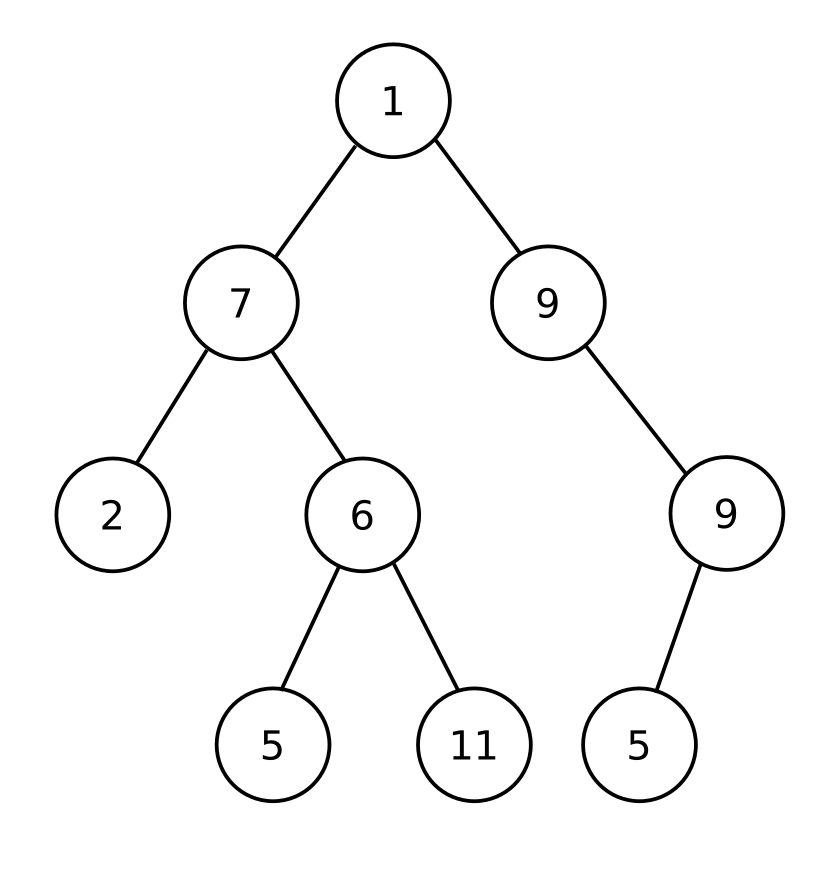
Key terminology:
- Root: Top node with no parent
- Parent: Node with children below it
- Child: Node with a parent above it
- Leaf: Node with no children
- Height: Number of levels in the tree
Sequential Files
A sequential file stores data in a linear sequence. You must read through records in order from start to finish.
Example: CSV files (Comma-Separated Values)
Name,ID,GPA
Ulrich,12345,3.85
Sarah,12346,3.92
James,12347,3.78import csv
# Reading sequential file
with open('students.csv', 'r') as file:
csv_reader = csv.reader(file)
# Skip header row
next(csv_reader)
# Read each record in sequence
for row in csv_reader:
name, id, gpa = row
print(f"Student: {name}, ID: {id}, GPA: {gpa}")Advantages: Simple, easy to process all records
Disadvantages: Slow to find specific records (must read sequentially)
Data Dictionaries
A data dictionary is documentation that describes the structure of data in a system. It defines:
- Field names
- Data types
- Constraints (e.g., "must be between 0-100")
- Descriptions of what each field represents
| Field Name | Data Type | Length | Constraints | Description |
|---|---|---|---|---|
| StudentID | Integer | 5 digits | Unique, Required | Unique identifier for student |
| FirstName | String | Max 50 chars | Required | Student's first name |
| GPA | Float | - | 0.0 - 4.0 | Grade point average |
| EnrollmentDate | Date | - | Cannot be future | Date student enrolled |
Representing Algorithms: Flowcharts & Pseudocode
Flowcharts
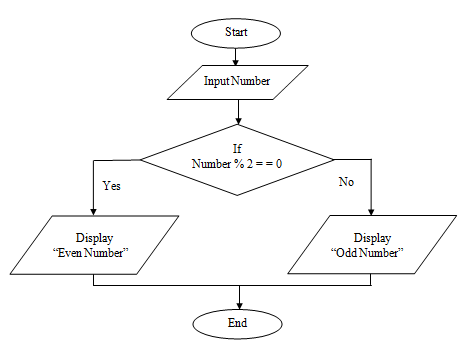
A flowchart is a visual diagram that shows the step-by-step flow of an algorithm using standard symbols.
| Symbol | Name | Purpose |
|---|---|---|
| Oval | Start/End | Beginning or end of algorithm |
| Rectangle | Process | An action or operation |
| Diamond | Decision | A yes/no question or condition |
| Parallelogram | Input/Output | Getting data or displaying results |
| Arrow | Flow Line | Direction of flow |
Pseudocode
Pseudocode is a plain-language description of code that's easier to read than actual programming languages but more structured than plain English.
ALGORITHM FindMaximum
    INPUT: numbers (array of integers)
    OUTPUT: maximum value

    SET max = numbers[0]

    FOR each number in numbers DO
        IF number > max THEN
            SET max = number
        END IF
    END FOR

    RETURN max
END ALGORITHMdef find_maximum(numbers):
max_value = numbers[0]
for number in numbers:
if number > max_value:
max_value = number
return max_value
# Test
scores = [85, 92, 78, 95, 88]
print(find_maximum(scores)) # Output: 95Structure Charts
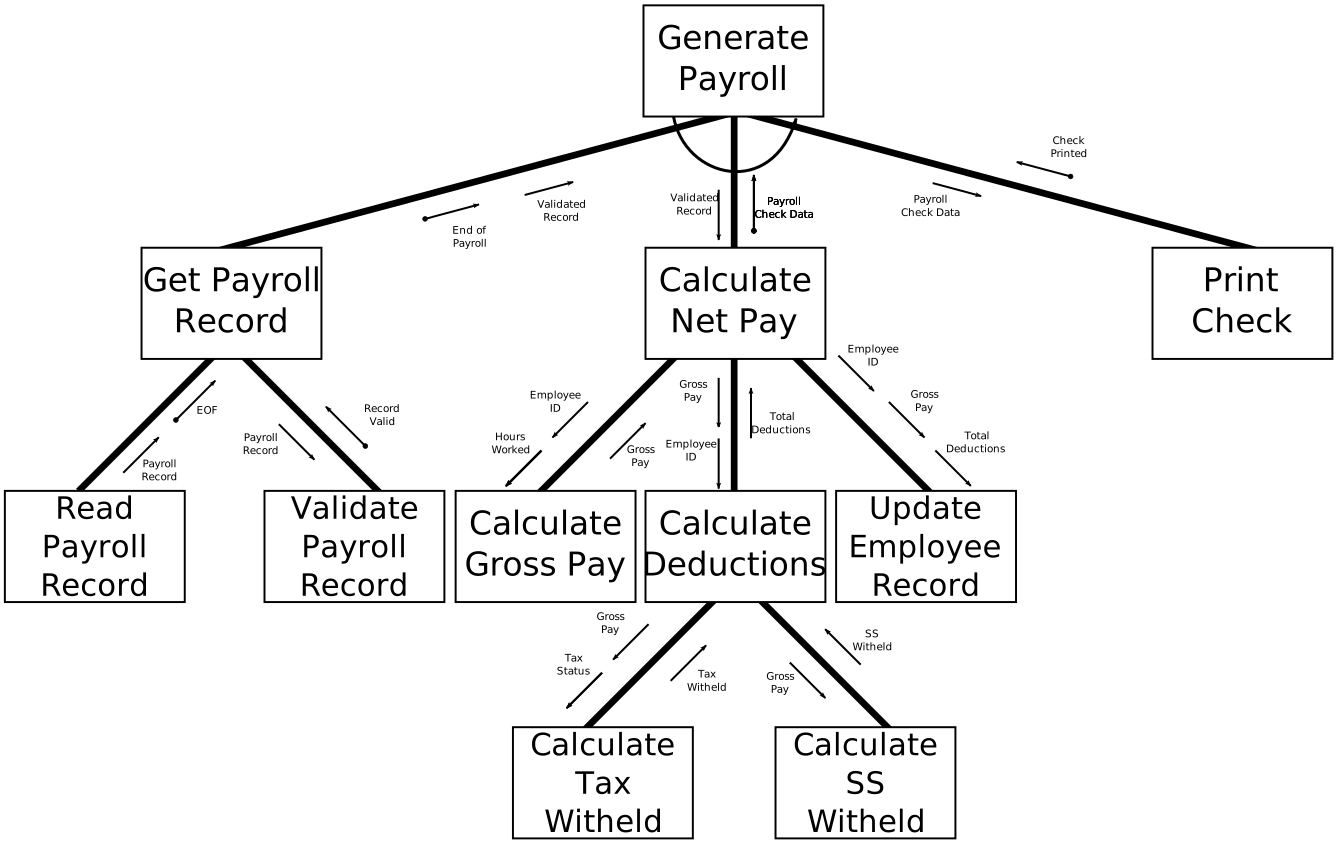
A structure chart shows how a program is broken down into smaller modules or functions. It shows the hierarchy and relationships between different parts of the program.
Abstraction and Refinement Diagrams
Abstraction: Starting with a high-level description and gradually adding detail
Refinement: The process of breaking down abstract concepts into detailed steps
Level 1 (Most Abstract): Make toast
Level 2:
- Get bread
- Toast bread
- Add toppings
Level 3 (Most Detailed):
- Get bread
- Open cupboard
- Take bread loaf
- Remove two slices
- Toast bread
- Place slices in toaster
- Set timer to medium
- Push down lever
- Wait for toast to pop up
Advanced Algorithmic Strategies
Divide and Conquer
Divide and Conquer breaks a problem into smaller sub-problems, solves them independently, then combines the results.
Steps:
- Divide: Break the problem into smaller parts
- Conquer: Solve each part recursively
- Combine: Merge the solutions
Problem: Sort the list [38, 27, 43, 3, 9, 82, 10]
- Divide: Split into [38, 27, 43, 3] and [9, 82, 10]
- Keep dividing until you have individual elements
- Conquer: Sort the small pieces
- Combine: Merge sorted pieces back together
def merge_sort(arr):
    if len(arr) <= 1:
        return arr

    # DIVIDE
    mid = len(arr) // 2
    left = merge_sort(arr[:mid])
    right = merge_sort(arr[mid:])

    # COMBINE (merge sorted halves)
    return merge(left, right)

def merge(left, right):
    result = []
    i = j = 0

    while i < len(left) and j < len(right):
        if left[i] < right[j]:
            result.append(left[i])
            i += 1
        else:
            result.append(right[j])
            j += 1

    result.extend(left[i:])
    result.extend(right[j:])
    return result
Backtracking
Backtracking tries different solutions and "backs up" when it hits a dead end. It's like solving a maze - if you hit a wall, you go back and try a different path.
Common uses:
- Solving puzzles (Sudoku, N-Queens problem)
- Finding paths in a maze
- Generating all possible combinations
Problem: Find all possible subsets of [1, 2, 3]
def find_subsets(nums):
    result = []

    def backtrack(start, current_subset):
        # Add current subset to results
        result.append(current_subset[:])

        # Try adding each remaining number
        for i in range(start, len(nums)):
            current_subset.append(nums[i])  # Choose
            backtrack(i + 1, current_subset)  # Explore
            current_subset.pop()  # Backtrack (undo choice)

    backtrack(0, [])
    return result

# Test
print(find_subsets([1, 2, 3]))
# Output: [[], [1], [1,2], [1,2,3], [1,3], [2], [2,3], [3]]- Divide & Conquer: Breaks problem into independent parts, solves each once
- Backtracking: Explores possibilities step-by-step, undoing wrong choices
Design Approaches: Top-Down vs Bottom-Up
🔽 Top-Down Design
Start with the big picture, then break it down
- Begin with main problem
- Divide into sub-problems
- Keep dividing until simple
- Like creating an outline first
Example: Design a calculator
- Main program
- → Get inputs
- → Perform calculation
- → Display result
🔼 Bottom-Up Design
Build small components first, then combine
- Start with basic functions
- Test each component
- Combine into larger system
- Like building with Lego blocks
Example: Design a calculator
- Create add() function
- Create subtract() function
- Create multiply() function
- Combine into calculator
In practice: Most developers use a combination of both approaches!
Project Management Methodologies
How do teams organize software development projects? Two main approaches dominate the industry:
Waterfall Model
Sequential, linear approach
Phases (in strict order):
- Requirements gathering
- System design
- Implementation
- Testing
- Deployment
- Maintenance
Characteristics:
- Each phase must complete before next begins
- Heavy documentation
- Clear milestones
- Difficult to change requirements
- Testing happens late
Best for:
- Well-defined projects
- Regulated industries (healthcare, aerospace)
- Fixed-price contracts
- Projects with stable requirements
Pros:
- ✓ Clear structure and timeline
- ✓ Easy to manage
- ✓ Well-documented
- ✓ Works well for small projects
Cons:
- ✗ Inflexible to changes
- ✗ Late testing reveals problems
- ✗ Customer sees product late
- ✗ High risk for complex projects
Agile Model
Iterative, flexible approach
Process (repeating cycles):
- Plan sprint (2-4 weeks)
- Design features
- Develop features
- Test continuously
- Review & demo
- Repeat with new features
Characteristics:
- Short development cycles (sprints)
- Continuous feedback
- Adaptive to changes
- Working software delivered frequently
- Testing throughout development
Best for:
- Evolving requirements
- Startups and tech companies
- Customer-facing applications
- Complex, innovative projects
Pros:
- ✓ Flexible to changes
- ✓ Early & frequent delivery
- ✓ Continuous customer feedback
- ✓ Reduced risk
Cons:
- ✗ Less predictable timeline
- ✗ Requires customer involvement
- ✗ Can lack documentation
- ✗ Hard to estimate total cost
Building a Social Media App:
Waterfall Approach:
- Spend 3 months gathering all requirements
- Spend 4 months designing entire system
- Spend 8 months coding everything
- Spend 2 months testing
- Launch complete app after 17 months
- Risk: Users might not like what you built!
Agile Approach:
- Sprint 1 (2 weeks): User registration & login → Test with users
- Sprint 2: Profile pages → Get feedback
- Sprint 3: Photo posting → Adjust based on feedback
- Sprint 4: Commenting feature → Continue improving
- Launch early version after 8 weeks, keep adding features
- Benefit: Users guide development!
Be able to explain when to use each methodology and compare their advantages/disadvantages. This is a common exam question!
Algorithm Analysis & Testing
Analyzing Algorithms
When evaluating an algorithm, consider:
- Inputs: What data does it need?
- Outputs: What does it produce?
- Purpose: What problem does it solve?
- Efficiency: How fast does it run?
- Correctness: Does it always work?
def linear_search(arr, target):
    for i in range(len(arr)):
        if arr[i] == target:
            return i
    return -1
Analysis:
- Input: Array (arr) and target value
- Output: Index of target, or -1 if not found
- Purpose: Find position of a value in an array
- Best case: Target is first element (1 comparison)
- Worst case: Target is last or not present (n comparisons)
- Efficiency: O(n) - linear time
Desk Checking
Desk checking is manually tracing through code with sample data to verify correctness before running it.
Steps:
- Create a table with columns for each variable
- Walk through each line of code
- Update variable values as they change
- Check if output matches expectations
total = 0
for i in range(1, 4):
    total = total + i
print(total)| Line | i | total | Note |
|---|---|---|---|
| 1 | - | 0 | Initialize total |
| 2 | 1 | 0 | First iteration |
| 3 | 1 | 1 | total = 0 + 1 |
| 2 | 2 | 1 | Second iteration |
| 3 | 2 | 3 | total = 1 + 2 |
| 2 | 3 | 3 | Third iteration |
| 3 | 3 | 6 | total = 3 + 3 |
| 4 | - | 6 | Output: 6 |
Peer Checking
Peer checking (also called code review) is when another programmer reviews your code to find errors and suggest improvements.
Benefits:
- Catches errors you might miss
- Improves code quality
- Shares knowledge between team members
- Ensures code follows standards
Knowledge Check
(1×16) + (1×8) + (0×4) + (1×2) + (0×1) = 16 + 8 + 2 = 26
Integer - Age is a whole number without decimals.
- Array: Collection of items of the same type, accessed by index
- Record: Collection of related fields of different types, accessed by field name
Use Waterfall when:
- Requirements are well-defined and unlikely to change
- Project is small and straightforward
- Heavy documentation is required (e.g., regulated industries)
- You have a fixed-price contract
Desk checking manually traces through code with sample data to verify it works correctly before running it. It helps catch logic errors early.
Practice Exercises
Complete these conversions:
- Convert decimal 45 to binary
- Convert binary 1101101 to decimal
- Convert hexadecimal 2F to decimal
- Represent -8 in 8-bit two's complement
Create a data dictionary for a student management system with these requirements:
- Student ID (unique, 6 digits)
- Full name (required, max 100 characters)
- Date of birth (must be in the past)
- GPA (between 0.0 and 4.0)
- Enrollment status (active or inactive)
Then: Write Python code to create a dictionary representing one student record
Create a flowchart for this algorithm:
"Ask the user for a password. If the password is 'secret123', display 'Access granted'. Otherwise, give them 2 more tries. After 3 failed attempts, display 'Account locked'."
count = 0
for num in [2, 4, 6, 8, 10]:
    if num > 5:
        count = count + 1
print(count)
Create a desk checking table showing the values of num and count after each iteration.
Lesson Summary
What We Covered Today
1. Number Systems:
- Binary (base-2), Decimal (base-10), Hexadecimal (base-16)
- Two's complement for negative numbers
- Conversions between number systems
2. Data Types:
- Integer, Float, String, Char, Boolean, Date/Time
- Choosing appropriate types for different data
- Type conversion in Python
3. Data Structures:
- Arrays/Lists: Ordered collections
- Records/Dictionaries: Related fields
- Trees: Hierarchical structures
- Sequential Files: Linear data storage
- Data Dictionaries: System documentation
4. Algorithm Representation:
- Flowcharts: Visual diagrams
- Pseudocode: Plain-language algorithms
- Structure Charts: Program organization
- Abstraction & Refinement: Design process
5. Advanced Strategies:
- Divide and Conquer: Break into parts, solve, combine
- Backtracking: Try solutions, undo if wrong
6. Design Approaches:
- Top-Down: Start big, break down
- Bottom-Up: Build small, combine up
7. Project Management:
- Waterfall: Sequential, rigid, documentation-heavy
- Agile: Iterative, flexible, feedback-driven
8. Algorithm Analysis:
- Inputs, Outputs, Purpose, Efficiency
- Desk Checking: Manual verification
- Peer Checking: Code review
Homework & Next Steps
- Complete all practice exercises from this lesson
- Practice number conversions: Do 10 binary→decimal and 5 decimal→binary conversions
- Create a flowchart for a real-world process (e.g., making a sandwich, doing homework)
- Research: Find a real company that uses Agile methodology. What benefits did they get?
- Code challenge: Write a Python program that stores information about 3 students using dictionaries, then prints a report
Next Lesson Preview: We'll dive into Object-Oriented Programming (OOP) fundamentals - classes, objects, inheritance, polymorphism, and encapsulation!