What You'll Learn Today
Object-Oriented Programming (OOP) is the foundation of modern software development. Apps like Instagram, Spotify, and even operating systems are built using OOP principles. Today you'll understand:
- What objects and classes are, and why they matter
- The five core OOP concepts (encapsulation, abstraction, inheritance, polymorphism, generalization)
- How OOP differs from procedural programming
- UML diagrams and how to design object-oriented systems
- Testing methodologies for ensuring code quality
- Collaborative development practices
What is Object-Oriented Programming?
Imagine you're building a car racing game. You need to represent different cars, each with:
- Properties: Color, speed, fuel level
- Actions: Accelerate, brake, turn
Instead of writing separate code for every single car, OOP lets you create a blueprint (class) that defines what all cars have in common. Then you create individual objects (instances) from that blueprint.
Class = Blueprint: Architectural plans for a house
Object = Instance: Actual houses built from those plans
You can build 100 houses from one blueprint, and each house is a separate object with its own unique characteristics (paint color, furniture, residents) but follows the same structure.
Object-Oriented Programming (OOP) is a programming paradigm that organizes code around "objects" - entities that contain both data (attributes) and behaviors (methods).
The Five Pillars of OOP
1. Objects and Classes
Class: A template or blueprint that defines the structure and behavior of objects
Object: A specific instance created from a class
# Define a class (blueprint)
class Dog:
    # Constructor - runs when creating a new object
    def __init__(self, name, breed, age):
        self.name = name      # Attribute
        self.breed = breed    # Attribute
        self.age = age        # Attribute

    # Methods (behaviors)
    def bark(self):
        return f"{self.name} says Woof!"

    def celebrate_birthday(self):
        self.age += 1
        return f"Happy birthday {self.name}! Now {self.age} years old."

# Create objects (instances)
dog1 = Dog("Max", "Golden Retriever", 3)
dog2 = Dog("Bella", "Poodle", 5)

# Use the objects
print(dog1.bark())                    # Max says Woof!
print(dog2.celebrate_birthday())      # Happy birthday Bella! Now 6 years old.
print(f"{dog1.name} is a {dog1.breed}")  # Max is a Golden Retriever
Explanation:
Dogis the class (blueprint)dog1anddog2are objects (instances)name,breed,ageare attributes (data)bark(),celebrate_birthday()are methods (behaviors)
2. Encapsulation (Data Hiding)
Encapsulation means bundling data and methods together, and controlling access to them. It protects data from being accidentally modified.
Think of it like: A TV remote. You don't need to know how the circuit board works inside - you just press buttons (public interface). The internal electronics are hidden (private data).
class BankAccount:
    def __init__(self, account_holder, initial_balance):
        self.account_holder = account_holder
        self.__balance = initial_balance  # Private attribute (double underscore)

    # Public method to deposit money
    def deposit(self, amount):
        if amount > 0:
            self.__balance += amount
            return f"Deposited ${amount}. New balance: ${self.__balance}"
        else:
            return "Invalid deposit amount"

    # Public method to withdraw money
    def withdraw(self, amount):
        if 0 < amount <= self.__balance:
            self.__balance -= amount
            return f"Withdrew ${amount}. Remaining balance: ${self.__balance}"
        else:
            return "Insufficient funds or invalid amount"

    # Public method to check balance
    def get_balance(self):
        return f"Current balance: ${self.__balance}"

# Create account
account = BankAccount("Ulrich", 1000)

# Use public methods
print(account.deposit(500))        # Deposited $500. New balance: $1500
print(account.withdraw(200))       # Withdrew $200. Remaining balance: $1300
print(account.get_balance())       # Current balance: $1300

# This would cause an error (trying to access private data directly):
# print(account.__balance)  # AttributeError!
Why this matters:
- Balance can't be changed directly (protected from mistakes)
- Must use proper methods (deposit/withdraw) which include validation
- Internal implementation can change without breaking code that uses the class
3. Abstraction (Simplifying Complexity)
Abstraction means hiding complex implementation details and showing only essential features.
Real-world example: When you drive a car, you use the steering wheel, pedals, and gear shift. You don't need to understand how the engine combustion works or how the transmission system operates - those details are abstracted away.
class EmailService:
    def send_email(self, recipient, subject, message):
        # User only calls this simple method
        self.__connect_to_server()
        self.__authenticate()
        self.__compose_email(recipient, subject, message)
        self.__transmit()
        self.__close_connection()
        return "Email sent successfully!"

    # All these complex details are hidden (abstracted)
    def __connect_to_server(self):
        # Complex networking code here
        pass

    def __authenticate(self):
        # Complex authentication logic here
        pass

    def __compose_email(self, recipient, subject, message):
        # Email formatting logic here
        pass

    def __transmit(self):
        # SMTP transmission logic here
        pass

    def __close_connection(self):
        # Cleanup code here
        pass

# User just needs one simple line!
email_service = EmailService()
email_service.send_email("friend@example.com", "Hello", "How are you?")
Benefits: Users don't need to know the complex steps - they just call one method.
4. Inheritance (Parent-Child Relationships)
Inheritance allows a class to inherit attributes and methods from another class. This promotes code reuse.
Terminology:
- Parent Class (Superclass/Base Class): The class being inherited from
- Child Class (Subclass/Derived Class): The class that inherits
# Parent class (base/superclass)
class Employee:
    def __init__(self, name, employee_id, salary):
        self.name = name
        self.employee_id = employee_id
        self.salary = salary

    def get_details(self):
        return f"Employee: {self.name}, ID: {self.employee_id}"

    def calculate_annual_salary(self):
        return self.salary * 12

# Child class 1 (inherits from Employee)
class Developer(Employee):
    def __init__(self, name, employee_id, salary, programming_language):
        # Call parent constructor
        super().__init__(name, employee_id, salary)
        self.programming_language = programming_language

    def write_code(self):
        return f"{self.name} is coding in {self.programming_language}"

# Child class 2 (inherits from Employee)
class Manager(Employee):
    def __init__(self, name, employee_id, salary, team_size):
        super().__init__(name, employee_id, salary)
        self.team_size = team_size

    def conduct_meeting(self):
        return f"{self.name} is leading a meeting with {self.team_size} team members"

# Create objects
dev = Developer("Alice", "E001", 5000, "Python")
mgr = Manager("Bob", "M001", 7000, 10)

# Both inherit from Employee
print(dev.get_details())                # Employee: Alice, ID: E001
print(dev.calculate_annual_salary())    # 60000
print(dev.write_code())                 # Alice is coding in Python

print(mgr.get_details())                # Employee: Bob, ID: M001
print(mgr.conduct_meeting())            # Bob is leading a meeting with 10 team members
What happened:
DeveloperandManagerinherit all attributes/methods fromEmployee- They can reuse
get_details()andcalculate_annual_salary() - Each child class also has its own unique methods
5. Polymorphism (Same Interface, Different Behavior)
Polymorphism means "many forms." The same method name can have different implementations in different classes.
Real-world analogy: A "speak" command means different things for different animals - dogs bark, cats meow, birds chirp.
class Animal:
    def __init__(self, name):
        self.name = name

    def speak(self):
        pass  # To be overridden by child classes

class Dog(Animal):
    def speak(self):
        return f"{self.name} says Woof!"

class Cat(Animal):
    def speak(self):
        return f"{self.name} says Meow!"

class Bird(Animal):
    def speak(self):
        return f"{self.name} says Chirp!"

# Create different animals
animals = [
    Dog("Max"),
    Cat("Whiskers"),
    Bird("Tweety"),
    Dog("Buddy")
]

# Polymorphism in action - same method, different behaviors
for animal in animals:
    print(animal.speak())

# Output:
# Max says Woof!
# Whiskers says Meow!
# Tweety says Chirp!
# Buddy says Woof!
The power: We can call speak() on any animal without knowing its specific type!
Bonus: Generalization
Generalization is the process of extracting common characteristics from specific classes to create a more general parent class.
It's the opposite of specialization - you identify what's common among multiple classes and move it to a parent class.
If you have Circle, Rectangle, and Triangle classes, you notice they all share:
- Color
- Position (x, y coordinates)
- Methods: draw(), move()
You can generalize by creating a Shape parent class containing these common features!
- Classes & Objects: Blueprints and instances
- Encapsulation: Data hiding and protection
- Abstraction: Hiding complexity
- Inheritance: Code reuse through parent-child relationships
- Polymorphism: Same method, different implementations
Procedural Programming vs Object-Oriented Programming
📝 Procedural Programming
Focus: Functions and procedures
Characteristics:
- Top-down approach
- Data and functions are separate
- Functions operate on data
- Global data can be accessed by any function
- Examples: C, Pascal, early BASIC
Advantages:
- ✓ Simple and straightforward
- ✓ Easy to learn for beginners
- ✓ Good for small programs
- ✓ Efficient execution
Disadvantages:
- ✗ Hard to manage large programs
- ✗ Difficult to reuse code
- ✗ Global data can cause bugs
- ✗ Hard to model real-world entities
🎯 Object-Oriented Programming
Focus: Objects containing data and methods
Characteristics:
- Bottom-up approach
- Data and functions bundled together
- Objects interact through messages
- Data encapsulated in objects
- Examples: Python, Java, C++, JavaScript
Advantages:
- ✓ Models real-world entities naturally
- ✓ Code reuse through inheritance
- ✓ Easier to maintain and modify
- ✓ Data security through encapsulation
Disadvantages:
- ✗ Steeper learning curve
- ✗ Can be slower than procedural
- ✗ More complex for simple tasks
- ✗ Requires more planning
Task: Calculate area of rectangles
# Procedural: Functions operate on data
def calculate_area(width, height):
    return width * height

def calculate_perimeter(width, height):
    return 2 * (width + height)

# Data is separate
rectangle1_width = 10
rectangle1_height = 5
rectangle2_width = 8
rectangle2_height = 4

# Call functions with data
area1 = calculate_area(rectangle1_width, rectangle1_height)
perimeter1 = calculate_perimeter(rectangle1_width, rectangle1_height)

print(f"Area: {area1}, Perimeter: {perimeter1}")# OOP: Data and methods bundled together
class Rectangle:
def __init__(self, width, height):
self.width = width
self.height = height
def calculate_area(self):
return self.width * self.height
def calculate_perimeter(self):
return 2 * (self.width + self.height)
# Create objects (data + methods together)
rectangle1 = Rectangle(10, 5)
rectangle2 = Rectangle(8, 4)
# Objects know how to calculate their own properties
print(f"Area: {rectangle1.calculate_area()}, Perimeter: {rectangle1.calculate_perimeter()}")Key difference: In OOP, the rectangle "knows" how to calculate its own area. In procedural, you need external functions.
UML Diagrams - Visualizing OOP Design
UML (Unified Modeling Language) is a standard way to visualize software design. It helps you plan before coding!
Class Diagrams
A class diagram shows the structure of classes, their attributes, methods, and relationships.
Components:
- Class Name: Top section
- Attributes: Middle section (data/properties)
- Methods: Bottom section (behaviors/functions)
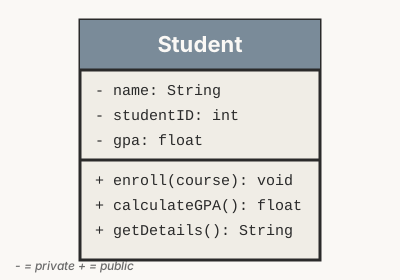
Visibility Symbols:
+Public: Accessible from anywhere-Private: Accessible only within the class#Protected: Accessible within class and subclasses
Example:
- name: Stringmeans name is a private string attribute+ enroll(course): voidmeans enroll is a public method that takes a course parameter and returns nothing
Relationships in Class Diagrams
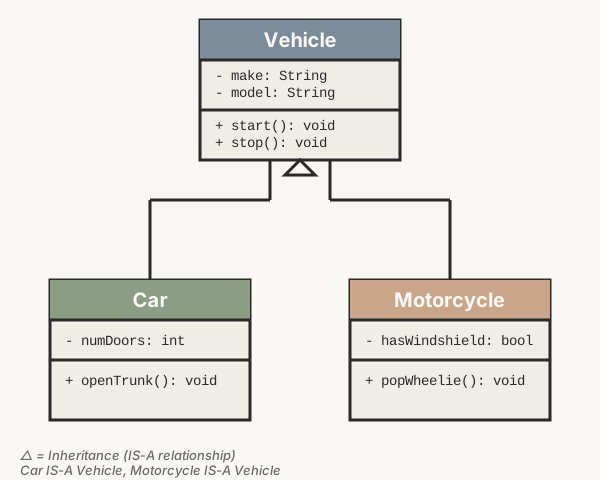
| Relationship | Symbol | Meaning | Example |
|---|---|---|---|
| Inheritance | Arrow with hollow triangle | "Is-a" relationship | Dog IS-A Animal |
| Association | Simple line | General relationship | Student enrolled in Course |
| Aggregation | Line with hollow diamond | "Has-a" (weak ownership) | Department HAS Students |
| Composition | Line with filled diamond | "Owns" (strong ownership) | House OWNS Rooms |
Data Flow Diagrams (DFD)
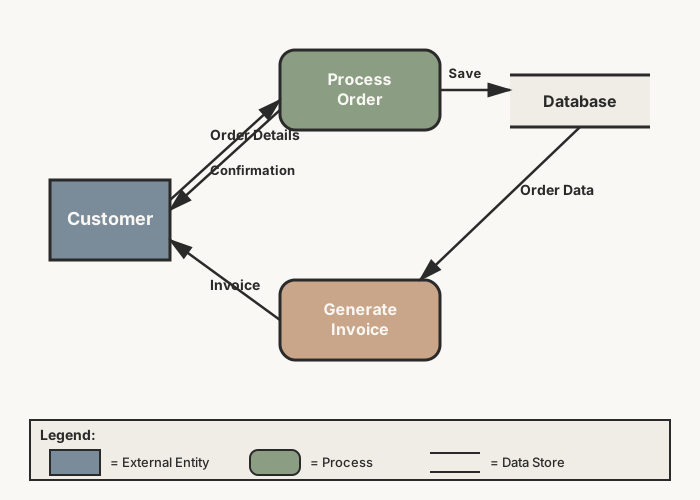
A Data Flow Diagram shows how data moves through a system.
Symbols:
- Circle/Process: An action or transformation
- Arrow: Data flow direction
- Rectangle: External entity (user, system)
- Parallel lines: Data store (database, file)
Structure Charts
Structure charts show the hierarchical organization of modules in a program.
They're useful for breaking down complex systems into manageable parts (following top-down design).
Example: A student management system might have:
- Main Module → Student Management
- → Add Student
- → View Students
- → Update Student
- → Delete Student
- → Calculate GPA (which further breaks into Get Grades → Compute Average)
OOP Design Processes
Task Definition
Before designing classes, you must clearly define what the system needs to do:
- Identify requirements: What problem are we solving?
- Define scope: What's included and excluded?
- List features: What must the system do?
- Identify users: Who will use this?
Requirements:
- Track books (title, author, ISBN, availability)
- Manage members (name, ID, borrowed books)
- Handle borrowing and returning books
- Calculate late fees
- Search for books by title or author
Potential Classes: Book, Member, Loan, Library
Top-Down Design in OOP
Top-down design starts with the big picture and breaks it into smaller pieces:
- Identify the main system
- Break it into major subsystems (classes)
- Define each class's responsibilities
- Identify relationships between classes
- Refine each class's attributes and methods
Bottom-Up Design in OOP
Bottom-up design starts with individual components and builds up:
- Identify basic entities (simple classes)
- Implement and test each class independently
- Combine classes into larger subsystems
- Build the complete system from tested components
Facade Pattern
The facade pattern provides a simplified interface to a complex system of classes.
Think of it like: A restaurant menu is a facade. You order "Burger Combo" without knowing all the complex kitchen processes behind it.
# Complex subsystems
class PaymentProcessor:
    def process_payment(self, amount):
        return f"Processing ${amount} payment"

class InventorySystem:
    def check_stock(self, item):
        return f"Checking stock for {item}"

    def update_stock(self, item):
        return f"Updating stock for {item}"

class ShippingService:
    def arrange_delivery(self, address):
        return f"Arranging delivery to {address}"

# Facade - provides simple interface
class OrderFacade:
    def __init__(self):
        self.payment = PaymentProcessor()
        self.inventory = InventorySystem()
        self.shipping = ShippingService()

    def place_order(self, item, amount, address):
        # User just calls one method, but complex operations happen behind the scenes
        print(self.inventory.check_stock(item))
        print(self.payment.process_payment(amount))
        print(self.inventory.update_stock(item))
        print(self.shipping.arrange_delivery(address))
        return "Order placed successfully!"

# Simple usage
order_system = OrderFacade()
order_system.place_order("Laptop", 1200, "123 Main St")
Agile Development in OOP
OOP works perfectly with Agile methodology:
- Iterative development: Build one class at a time, test, refine
- Flexibility: Easy to add new classes or modify existing ones
- Encapsulation supports change: Internal changes don't break other code
- Inheritance allows extension: Add new features by creating subclasses
Message Passing & Code Optimization
Message Passing Between Objects
In OOP, objects communicate by sending messages (calling methods on other objects).
Instead of accessing data directly, objects ask other objects to perform actions.
class Customer:
    def __init__(self, name, account):
        self.name = name
        self.account = account  # Customer HAS-A BankAccount

    def make_purchase(self, amount):
        # Customer sends a message to BankAccount object
        result = self.account.withdraw(amount)
        return f"{self.name}: {result}"

class BankAccount:
    def __init__(self, balance):
        self.balance = balance

    def withdraw(self, amount):
        if amount <= self.balance:
            self.balance -= amount
            return f"Purchase successful. Remaining balance: ${self.balance}"
        else:
            return "Insufficient funds"

# Objects communicating
account = BankAccount(1000)
customer = Customer("Ulrich", account)

# Customer object sends message to BankAccount object
print(customer.make_purchase(200))  # Ulrich: Purchase successful. Remaining balance: $800
Notice: Customer doesn't directly access account.balance - it sends a message via withdraw()
Code Optimization in OOP
Optimization strategies:
- DRY Principle (Don't Repeat Yourself): Use inheritance to avoid duplicate code
- Lazy Loading: Only create objects when needed
- Object Pooling: Reuse objects instead of creating new ones repeatedly
- Efficient Data Structures: Choose appropriate data structures for your use case
Before (Inefficient - Repeated Code):
class Dog:
    def __init__(self, name):
        self.name = name

    def eat(self):
        print(f"{self.name} is eating")

    def sleep(self):
        print(f"{self.name} is sleeping")

class Cat:
    def __init__(self, name):
        self.name = name

    def eat(self):  # Duplicate code!
        print(f"{self.name} is eating")

    def sleep(self):  # Duplicate code!
        print(f"{self.name} is sleeping")
After (Optimized - Using Inheritance):
class Animal:
    def __init__(self, name):
        self.name = name

    def eat(self):
        print(f"{self.name} is eating")

    def sleep(self):
        print(f"{self.name} is sleeping")

class Dog(Animal):
    def bark(self):
        print(f"{self.name} barks")

class Cat(Animal):
    def meow(self):
        print(f"{self.name} meows")

# Code reused, not duplicated!Testing Methodologies
Testing ensures your code works correctly. In OOP, there are different levels and types of testing.
Testing Levels
| Test Level | What It Tests | Example | When to Use |
|---|---|---|---|
| Unit Testing | Individual methods/classes | Test if calculate_area() method returns correct value |
While developing each class |
| Subsystem Testing | Groups of related classes | Test if payment subsystem (PaymentProcessor + Invoice) works together | After integrating related classes |
| System Testing | Entire application | Test complete e-commerce site from browsing to checkout | Before deployment |
Testing Techniques
Black Box Testing
Tester doesn't know internal code
- Focus on inputs and outputs
- Test from user perspective
- Don't need programming knowledge
- Example: Enter username/password, check if login succeeds
Analogy: Testing a car by driving it without opening the hood
White Box Testing
Tester knows internal code structure
- Test internal logic and paths
- Ensure all code branches execute
- Requires programming knowledge
- Example: Check if all IF/ELSE branches in login method are tested
Analogy: Testing a car by inspecting engine, wiring, etc.
Grey Box Testing
Combination of both approaches
- Partial knowledge of internal structure
- Design tests based on architecture
- More comprehensive than black box alone
- Example: Know that login checks database, test with valid/invalid credentials and database errors
Best for: Integration testing between modules
import unittest

class Rectangle:
    def __init__(self, width, height):
        self.width = width
        self.height = height

    def calculate_area(self):
        return self.width * self.height

# Unit tests for Rectangle class
class TestRectangle(unittest.TestCase):

    def test_area_positive_numbers(self):
        rect = Rectangle(5, 10)
        self.assertEqual(rect.calculate_area(), 50)

    def test_area_with_zero(self):
        rect = Rectangle(0, 10)
        self.assertEqual(rect.calculate_area(), 0)

    def test_area_decimals(self):
        rect = Rectangle(5.5, 2.0)
        self.assertEqual(rect.calculate_area(), 11.0)

# Run tests
if __name__ == '__main__':
    unittest.main()
Benefits: Automated tests catch bugs early and ensure changes don't break existing functionality.
Collaborative OOP Development
Version Control
Version control systems (like Git) are essential for team collaboration:
- Track changes: See who changed what and when
- Branching: Work on features independently
- Merging: Combine code from different developers
- Rollback: Undo mistakes by reverting to previous versions
- Developer A creates a branch to implement
Userclass - Developer B creates a branch to implement
Productclass - Both work independently without conflicts
- When done, both merge their branches into main branch
- If there are conflicts (e.g., both modified same file), Git helps resolve them
Code Commenting Best Practices
Good comments make collaboration easier:
- Class-level comments: Explain what the class represents
- Method docstrings: Describe parameters, return values, purpose
- Inline comments: Explain complex logic (use sparingly)
class ShoppingCart:
    """
    Represents a shopping cart in an e-commerce system.

    Handles adding/removing items and calculating totals.
    """

    def __init__(self):
        """Initialize empty shopping cart."""
        self.items = []

    def add_item(self, product, quantity):
        """
        Add a product to the cart.

        Args:
            product (Product): The product object to add
            quantity (int): Number of units to add

        Returns:
            bool: True if successful, False if invalid quantity
        """
        if quantity <= 0:
            return False

        self.items.append({'product': product, 'quantity': quantity})
        return True

    def calculate_total(self):
        """
        Calculate total cost of all items in cart.

        Returns:
            float: Total price including all items
        """
        total = 0
        for item in self.items:
            total += item['product'].price * item['quantity']
        return total
Code Consistency
Teams establish coding standards to maintain consistency:
- Naming conventions: Classes use PascalCase, methods use snake_case
- File organization: One class per file, related classes in same directory
- Style guides: Python follows PEP 8 standards
- Code reviews: Team members review each other's code before merging
- Use version control (Git) religiously
- Write clear, descriptive comments and docstrings
- Follow team coding standards consistently
- Conduct regular code reviews
- Communicate design decisions with team
Knowledge Check
- Classes & Objects: Templates and instances
- Encapsulation: Data hiding and bundling
- Abstraction: Hiding complexity
- Inheritance: Parent-child relationships for code reuse
- Polymorphism: Same method name, different implementations
Class: A blueprint or template that defines structure and behavior (like architectural plans for a house)
Object: A specific instance created from a class (like an actual house built from those plans)
Example: Dog is a class; my_dog = Dog("Max") creates an object.
Encapsulation is bundling data and methods together and restricting direct access to internal data.
Importance:
- Protects data from accidental modification
- Enforces controlled access through methods
- Allows internal changes without breaking external code
- Improves security and maintainability
Procedural:
- Focuses on functions/procedures
- Data and functions are separate
- Top-down approach
OOP:
- Focuses on objects (data + methods bundled)
- Bottom-up approach
- Better for modeling real-world entities
- Easier code reuse through inheritance
Black Box Testing:
- Tester doesn't know internal code structure
- Tests based on inputs/outputs only
- User perspective testing
White Box Testing:
- Tester knows and examines internal code
- Tests code paths, branches, logic
- Developer perspective testing
Practice Exercises
Scenario: Design a class hierarchy for a university system.
- Create a
Personbase class with name and age - Create
Studentclass (inherits from Person) with student_id and gpa - Create
Professorclass (inherits from Person) with employee_id and department - Add appropriate methods to each class
Challenge: Draw a UML class diagram for your design before coding!
Create a Temperature class that:
- Stores temperature in Celsius (private attribute)
- Has methods to get/set temperature in Celsius
- Has methods to get/set temperature in Fahrenheit
- Validates that temperature is not below absolute zero (-273.15°C)
Hint: Formula: F = C × 9/5 + 32
Create a Shape parent class with:
- Child classes:
Circle,Rectangle,Triangle - Each class should have a
calculate_area()method - Create a list of different shapes and calculate total area
Formulas:
- Circle: π × r²
- Rectangle: width × height
- Triangle: (base × height) / 2
For the BankAccount class example from this lesson, write unit tests to check:
- Deposit with positive amount works correctly
- Deposit with negative amount is rejected
- Withdraw with sufficient funds works
- Withdraw with insufficient funds is rejected
- Balance is correctly updated after transactions
Lesson Summary
What We Covered Today
1. Core OOP Concepts:
- Classes (blueprints) and Objects (instances)
- Encapsulation (data hiding and bundling)
- Abstraction (hiding complexity)
- Inheritance (code reuse through parent-child relationships)
- Polymorphism (same interface, different implementations)
2. Procedural vs OOP:
- Procedural focuses on functions; OOP focuses on objects
- OOP better for complex systems and real-world modeling
- OOP provides better code reuse and maintainability
3. UML Diagrams:
- Class diagrams show structure and relationships
- Data flow diagrams show how data moves through systems
- Structure charts show hierarchical module organization
4. Design Processes:
- Top-down: Start with big picture, break down
- Bottom-up: Build components, combine upward
- Facade pattern simplifies complex subsystems
- Agile methodology works well with OOP
5. Testing & Collaboration:
- Unit, subsystem, and system testing levels
- Black box (external), white box (internal), grey box (hybrid) approaches
- Version control, code comments, and consistency standards
Homework & Next Steps
- Complete all practice exercises from this lesson
- Design a small OOP project: Choose a real-world system (library, restaurant, school) and:
- Identify at least 3 classes
- Draw a UML class diagram
- List attributes and methods for each class
- Show relationships (inheritance, association)
- Research: Find an open-source Python project on GitHub and identify:
- How they use inheritance
- Examples of encapsulation
- Any design patterns they use
- Review: Go back to Lesson 2 and think about how data structures (arrays, records, trees) relate to OOP classes
Next Lesson Preview: We'll dive into Year 12 content - Secure Software Architecture! You'll learn about the CIA Triad, common vulnerabilities, defensive programming, and how to build secure applications from the ground up.