What You'll Learn Today
In 2017, Equifax (one of the largest credit reporting agencies) was breached, exposing personal data of 147 million people. The vulnerability? A simple unpatched software flaw that could have been prevented with secure software practices.
Welcome to Secure Software Architecture - where you'll learn how to build software that protects users from day one. This lesson covers:
- Why secure software development matters and its real-world impact
- How to integrate security into every stage of the Software Development Life Cycle
- The CIA Triad: Confidentiality, Integrity, and Availability
- The AAA Model: Authentication, Authorization, and Accountability
- Security by Design and Privacy by Design principles
- How end-user capabilities influence security design
- Social, ethical, and legal implications of secure software
This lesson addresses:
- SE-12-04: Evaluates practices to safely and securely collect, use and store data
- SE-12-07: Designs, develops and implements safe and secure programming solutions
Why Secure Software Matters
Every app you use - Instagram, TikTok, banking apps, school portals - handles sensitive data. When software isn't secure, real people suffer real consequences.
Benefits of Developing Secure Software
1. Data Protection
- Protects user personal information (names, addresses, passwords)
- Safeguards financial data (credit cards, bank accounts)
- Secures sensitive communications
- Prevents identity theft and fraud
2. Minimizing Cyber Attacks and Vulnerabilities
- Reduces attack surface (fewer ways for hackers to break in)
- Prevents unauthorized access to systems
- Stops malware and ransomware infections
- Protects against data breaches and leaks
Target (2013)
- Impact: 40 million credit/debit card numbers stolen
- Cause: Weak security in vendor access system
- Cost: $162 million in settlements
Equifax (2017)
- Impact: 147 million people's personal data exposed
- Cause: Unpatched software vulnerability
- Cost: $700 million settlement + reputation damage
Marriott Hotels (2018)
- Impact: 500 million guest records compromised
- Cause: Insufficient security monitoring
- Cost: Stock price dropped 5.6%, massive legal costs
Common Thread: All could have been prevented with secure software practices!
Enterprise Benefits
Businesses that develop secure software gain significant advantages:
- Improved products/services: Users trust and prefer secure applications
- Productivity gains: Less time fixing security issues post-release
- Better work practices: Security culture improves overall code quality
- Business continuity: Prevents costly downtime from attacks
- Competitive advantage: Security as a selling point
- Regulatory compliance: Meets legal requirements (GDPR, privacy laws)
- Cost savings: Fixing vulnerabilities early is cheaper than after deployment
Security is NOT an afterthought - it must be built into software from the very beginning. Retrofitting security later is expensive, difficult, and often incomplete.
The Secure Software Development Life Cycle
Remember the Software Development Life Cycle (SDLC) from Lesson 2? Now we're adding a security layer to every stage. Secure software isn't created in one step - it's built through continuous security practices across the entire development process.
SDLC Stages with Security Integration
| Stage | Traditional Activities | Security Activities Added |
|---|---|---|
| 1. Planning | Define project scope, feasibility, resources |
• Define security requirements • Identify sensitive data to protect • Determine regulatory compliance needs (GDPR, Privacy Act) • Consider user capabilities and security expectations • Allocate budget for security features |
| 2. Analysis | Detailed requirements gathering and analysis |
• Specify authentication methods • Define access control levels and roles • Establish encryption standards • Document security constraints • Threat modeling (identify potential attacks) |
| 3. Design | System architecture and structure |
• Apply Security by Design principles • Apply Privacy by Design principles • Design secure APIs • Plan for secure data storage and transmission • Design audit logging mechanisms |
| 4. Implementation | Write code and integrate components |
• Use defensive programming techniques • Implement input validation and sanitization • Apply secure coding standards • Avoid common vulnerabilities (XSS, CSRF, SQL injection) • Code review with security focus • Verify secure communication between modules |
| 5. Testing | Test the complete system for functionality and bugs |
• Security testing (SAST, DAST) • Vulnerability assessment • Penetration testing • Test for privilege escalation • Verify all security requirements met |
| 6. Maintenance | Deploy, monitor, update, and fix issues |
• Secure configuration and deployment • Verify security settings • Establish monitoring and logging • Implement incident response plan • Apply security patches promptly • Monitor for new threats • Conduct regular security audits |
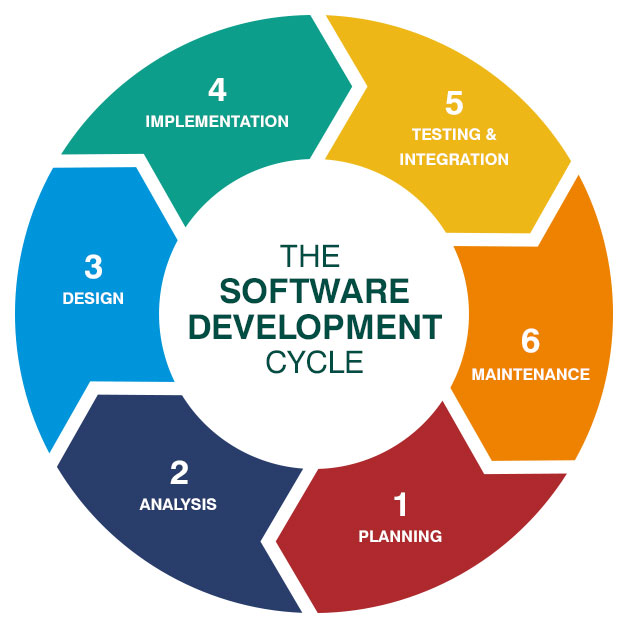
Source: DataRob (datarob.com)
1. Planning:
- Define scope: Build a portal for students, teachers, and admins
- Security requirement: "Students can only view their own grades"
- Identify sensitive data: Student records, grades, personal info
2. Analysis:
- Specify authentication: Username/password + 2FA option
- Define roles: Student, Teacher, Admin with different permissions
- Compliance: Privacy Act requirements for student data
3. Design:
- Role-based access control (students, teachers, admins have different permissions)
- Encrypted database connections
- Session management with timeouts
4. Implementation:
- Input validation on all login fields
- SQL injection protection
- Password hashing (never store plain text passwords)
5. Testing:
- Test: Can Student A access Student B's grades? (Should fail)
- Test: Does SQL injection bypass authentication? (Should fail)
- Test: Are passwords stored securely? (Check database)
6. Maintenance:
- Deploy with secure configuration
- Monitor login attempts for suspicious patterns
- Update authentication library when patches released
- Conduct annual security audit
Security isn't a single stage - it's woven into every phase of the SDLC. A chain is only as strong as its weakest link, and the same applies to software security.
The CIA Triad: Core Security Principles
The CIA Triad is the foundation of information security. Every security decision you make should consider these three principles.
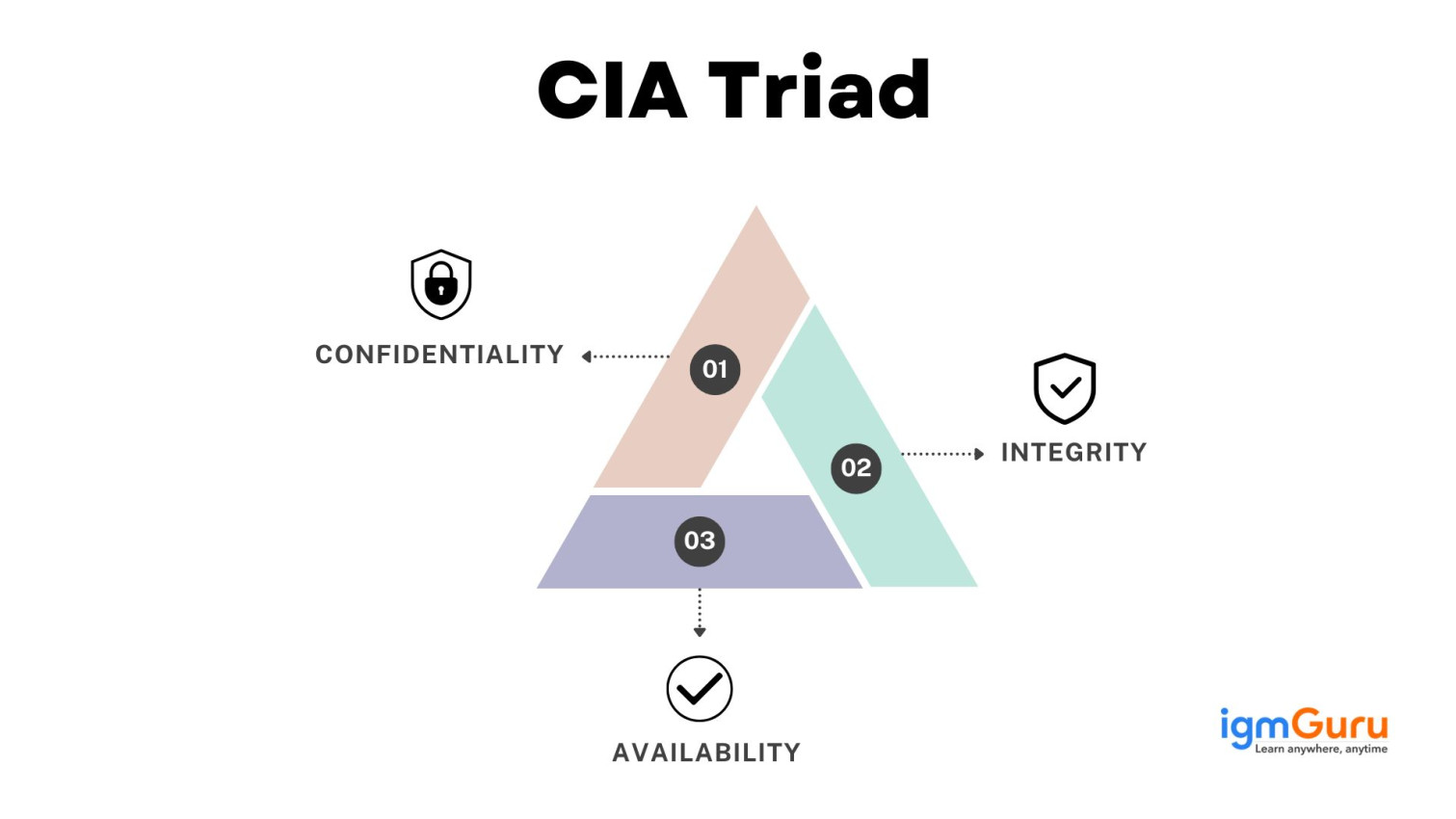
Source: IGM Guru (igmguru.com)
1. Confidentiality
Definition: Protecting data from unauthorized access - ensuring only authorized people can view sensitive information.
Real-World Analogy: Like sending a letter in a sealed envelope vs. a postcard. The envelope keeps the contents confidential; anyone can read a postcard.
Examples where confidentiality is critical:
- Medical records (only patient and authorized doctors can view)
- Bank account balances (only account holder can see)
- Private messages (only sender and recipient can read)
- Passwords (never displayed on screen, even to the user)
How to ensure confidentiality:
- Encryption: Transform data into unreadable format
- Access controls: Verify identity before granting access
- Strong authentication: Passwords, biometrics, 2FA
- Data classification: Label sensitive data appropriately
import hashlib

# BAD: Storing password in plain text
password_bad = "myPassword123"
# If database is breached, attacker sees actual password!

# GOOD: Hash the password before storing
password = "myPassword123"
hashed_password = hashlib.sha256(password.encode()).hexdigest()

print(f"Original: {password}")
print(f"Hashed: {hashed_password}")

# Output:
# Original: myPassword123
# Hashed: ef92b778bafe771e89245b89ecbc08a44a4e166c06659911881f383d4473e94f

# Even if database is breached, attacker can't reverse the hash!LinkedIn stored passwords using weak hashing (no "salt"). When breached, 6.5 million passwords were compromised. Users who reused passwords on other sites were at risk everywhere.
Lesson: Use strong, modern hashing algorithms with unique salts for each password.
2. Integrity
Definition: Ensuring data accuracy and trustworthiness - data hasn't been tampered with, modified, or corrupted (whether intentionally or accidentally).
Real-World Analogy: Tamper-proof medication packaging. If the seal is broken, you know the contents might have been altered.
Examples where integrity is critical:
- Financial transactions (amount shouldn't change between sending and receiving)
- Software downloads (file not corrupted or infected with malware)
- Medical records (dosage information must be accurate)
- Email messages (content shouldn't be altered in transit)
How to ensure integrity:
- Checksums/Hashes: Verify data hasn't changed
- Digital signatures: Verify authenticity and detect tampering
- Version control: Track all changes to code/data
- Input validation: Prevent malformed data entry
- Access controls: Limit who can modify data
import hashlib

def calculate_file_hash(file_content):
    """Calculate SHA256 hash of file content"""
    return hashlib.sha256(file_content.encode()).hexdigest()

# Original file
original_content = "This is the original file content."
original_hash = calculate_file_hash(original_content)
print(f"Original Hash: {original_hash}")

# Modified file (someone changed it)
modified_content = "This is the MODIFIED file content."
modified_hash = calculate_file_hash(modified_content)
print(f"Modified Hash: {modified_hash}")

# Verify integrity
if original_hash == modified_hash:
    print("✅ File integrity verified - content unchanged")
else:
    print("⚠️ WARNING: File has been modified!")

# Output:
# Original Hash: 3a7bd3e2360a3d29eea436fcfb7e44c735d117c42d1c1835420b6b9942dd4f1b
# Modified Hash: 8f434346648f6b96df89dda901c5176b10a6d83961dd3c1ac88b59b2dc327aa4
# ⚠️ WARNING: File has been modified!Malware modified industrial control systems' programming without detection, causing physical damage to Iranian nuclear centrifuges. The systems showed normal readings while actually malfunctioning.
Lesson: Verify integrity of both data AND code, especially in critical systems.
3. Availability
Definition: Ensuring systems and data are accessible when needed by authorized users. Even the most secure system is useless if users can't access it.
Real-World Analogy: Hospital emergency room - it MUST be available 24/7, because lives depend on it. Scheduled downtime could be fatal.
Examples where availability is critical:
- Emergency services (911 systems must never go down)
- E-commerce sites (downtime = lost sales)
- Banking systems (customers need access to their money)
- School exams (online tests must be accessible during exam period)
How to ensure availability:
- Redundancy: Backup servers if primary fails
- Load balancing: Distribute traffic across multiple servers
- DDoS protection: Defend against denial-of-service attacks
- Regular backups: Restore quickly if data is lost
- Monitoring: Detect and respond to issues immediately
- Disaster recovery plan: Prepared for worst-case scenarios
def connect_to_database(servers):
    """Try to connect to primary server, failover to backup if needed"""
    for server in servers:
        try:
            # Attempt connection
            connection = attempt_connection(server)
            print(f"✅ Connected to {server}")
            return connection
        except ConnectionError:
            print(f"❌ {server} unavailable, trying next...")

    print("⚠️ All servers unavailable!")
    return None

# Server list: primary first, then backups
servers = [
    "primary-server.com",
    "backup-server-1.com",
    "backup-server-2.com"
]

db_connection = connect_to_database(servers)

# If primary fails, automatically switches to backup
# This ensures AVAILABILITY even when servers go downMassive distributed denial-of-service (DDoS) attack on DNS provider Dyn made Twitter, Netflix, Reddit, Spotify, and many other major sites unavailable for hours.
Impact: Millions of users couldn't access services. Estimated cost: tens of millions of dollars in lost revenue.
Lesson: Even if data is confidential and intact, it's useless if the system isn't available.
Balancing the CIA Triad
Sometimes the three principles are in tension - improving one can weaken another:
Example 1: Confidentiality vs Availability
- Strong encryption protects confidentiality BUT can slow down system (affects availability)
- Solution: Use efficient encryption algorithms, hardware acceleration
Example 2: Integrity vs Availability
- Constant integrity checks (hashing every file) ensure data is correct BUT can slow system performance
- Solution: Check integrity at critical points, not continuously
Example 3: Availability vs Confidentiality
- Making system highly available (many access points) can create more security vulnerabilities
- Solution: Secure each access point, use strong authentication
- Confidentiality: Keep secrets secret (encryption, access control)
- Integrity: Ensure data is accurate and unaltered (hashing, validation)
- Availability: Ensure systems are accessible when needed (redundancy, DDoS protection)
All three must be considered together - neglecting any one creates security weaknesses.
The AAA Model: Authentication, Authorization, Accountability
While the CIA Triad focuses on data protection, the AAA Model focuses on user access control. These three concepts work together to manage who can do what in a system.
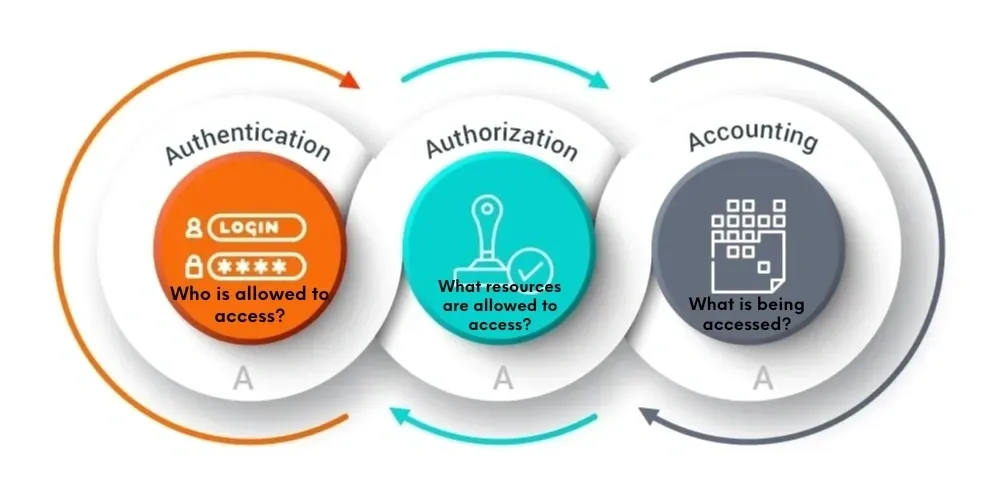
Source: AAA Model diagram used for educational purposes
1. Authentication
Definition: Verifying the identity of a user or system - proving "you are who you claim to be."
Real-World Analogy: Showing your driver's license at airport security. They verify you are actually the person named on the license before letting you through.
Authentication typically uses one or more of these factors:
1. Something you KNOW
- Passwords
- PIN codes
- Security questions
2. Something you HAVE
- Phone (for SMS codes)
- Security token/key
- Smart card
3. Something you ARE
- Fingerprint
- Face recognition
- Retina scan
- Voice recognition
Multi-Factor Authentication (MFA) / Two-Factor Authentication (2FA):
Combines two or more factors for stronger security. Example: Password (know) + SMS code (have)
import hashlib

# Simulated user database
user_database = {
    "ulrich": "ef92b778bafe771e89245b89ecbc08a44a4e166c06659911881f383d4473e94f"
    # This is the SHA256 hash of "myPassword123"
}

def hash_password(password):
    """Hash password for comparison"""
    return hashlib.sha256(password.encode()).hexdigest()

def authenticate(username, password):
    """Verify user identity"""
    # Check if username exists
    if username not in user_database:
        return False, "Invalid username"

    # Hash the provided password
    password_hash = hash_password(password)

    # Compare with stored hash
    if password_hash == user_database[username]:
        return True, "Authentication successful!"
    else:
        return False, "Invalid password"

# Test authentication
username = input("Username: ")
password = input("Password: ")

success, message = authenticate(username, password)
print(message)

if success:
    print("✅ Access granted")
else:
    print("❌ Access denied")
2. Authorization
Definition: Determining what an authenticated user is allowed to do - granting permissions based on identity and role.
Real-World Analogy: After entering a building (authentication via key card), your access level determines which floors you can visit. Interns can't access executive offices; executives can't access server rooms.
Critical Distinction: Authentication answers "WHO are you?" while Authorization answers "WHAT can you do?"
Different users, different permissions:
Student:
- ✅ Can view their own grades
- ✅ Can submit assignments
- ❌ Cannot view other students' grades
- ❌ Cannot modify grades
Teacher:
- ✅ Can view grades for their classes
- ✅ Can enter/modify grades for their students
- ❌ Cannot view other teachers' classes
- ❌ Cannot modify system settings
Administrator:
- ✅ Can view all data
- ✅ Can modify system settings
- ✅ Can create/delete user accounts
- ✅ Full access to all features
This is called Role-Based Access Control (RBAC) - permissions based on user roles.
class User:
    def __init__(self, username, role):
        self.username = username
        self.role = role  # "student", "teacher", or "admin"

def check_authorization(user, action):
    """Check if user is authorized to perform action"""

    # Define permissions for each role
    permissions = {
        "student": ["view_own_grades", "submit_assignment"],
        "teacher": ["view_class_grades", "enter_grades", "submit_assignment"],
        "admin": ["view_all_data", "modify_settings", "create_users", "enter_grades"]
    }

    # Check if user's role has permission for this action
    if user.role in permissions:
        if action in permissions[user.role]:
            return True, f"✅ {user.username} authorized for '{action}'"
        else:
            return False, f"❌ {user.username} NOT authorized for '{action}'"
    else:
        return False, "❌ Invalid role"

# Create users with different roles
student = User("ulrich", "student")
teacher = User("mr_jones", "teacher")
admin = User("principal_smith", "admin")

# Test authorization
print(check_authorization(student, "view_own_grades"))      # ✅ Allowed
print(check_authorization(student, "enter_grades"))         # ❌ Denied
print(check_authorization(teacher, "enter_grades"))         # ✅ Allowed
print(check_authorization(admin, "modify_settings"))        # ✅ Allowed

# Output:
# (True, "✅ ulrich authorized for 'view_own_grades'")
# (False, "❌ ulrich NOT authorized for 'enter_grades'")
# (True, "✅ mr_jones authorized for 'enter_grades'")
# (True, "✅ principal_smith authorized for 'modify_settings'")
3. Accountability
Definition: Tracking and logging user actions to ensure they can be held responsible - creating an audit trail of "who did what, when."
Real-World Analogy: Security cameras in a store. They don't prevent theft (though they deter it), but they create a record of what happened so culprits can be identified.
Purpose: Accountability serves multiple purposes:
- Deterrence (users behave better knowing actions are logged)
- Detection (identify security breaches or policy violations)
- Investigation (trace what happened after an incident)
- Compliance (prove you're following regulations)
Critical events to log:
- Login attempts (successful and failed)
- Access to sensitive data
- Changes to user permissions
- Data modifications (what was changed, by whom, when)
- System configuration changes
- Security events (suspected attacks, anomalies)
Each log entry should include:
- Who: User ID or username
- What: Action performed
- When: Date and time (with timezone)
- Where: IP address or location
- Result: Success or failure
from datetime import datetime

class AuditLog:
    def __init__(self):
        self.logs = []

    def log_action(self, username, action, resource, result):
        """Log user action for accountability"""
        log_entry = {
            "timestamp": datetime.now().strftime("%Y-%m-%d %H:%M:%S"),
            "username": username,
            "action": action,
            "resource": resource,
            "result": result
        }
        self.logs.append(log_entry)

        # In production, this would write to file or database
        print(f"[LOG] {log_entry['timestamp']} | User: {username} | "
              f"Action: {action} | Resource: {resource} | Result: {result}")

    def get_user_activity(self, username):
        """Retrieve all actions by specific user"""
        return [log for log in self.logs if log["username"] == username]

# Create audit log system
audit = AuditLog()

# Simulate user actions
audit.log_action("ulrich", "login", "school_portal", "success")
audit.log_action("ulrich", "view", "grades_page", "success")
audit.log_action("ulrich", "attempt_access", "admin_panel", "denied")
audit.log_action("ulrich", "logout", "school_portal", "success")

# Later: investigate what user did
print("\n--- User Activity Report ---")
ulrich_activity = audit.get_user_activity("ulrich")
for action in ulrich_activity:
    print(f"{action['timestamp']}: {action['action']} → {action['result']}")

# Output:
# [LOG] 2025-10-13 14:23:01 | User: ulrich | Action: login | Resource: school_portal | Result: success
# [LOG] 2025-10-13 14:23:15 | User: ulrich | Action: view | Resource: grades_page | Result: success
# [LOG] 2025-10-13 14:23:42 | User: ulrich | Action: attempt_access | Resource: admin_panel | Result: denied
# [LOG] 2025-10-13 14:24:10 | User: ulrich | Action: logout | Resource: school_portal | Result: successA financial company noticed an employee accessing customer records at 3 AM multiple times per week - unusual for their role. Audit logs revealed the pattern, leading to investigation. The employee was selling customer data to identity thieves.
Without accountability logging, this breach would have gone undetected.
How AAA Works Together
Scenario: Student Ulrich logs into school portal to view grades
Step 1: AUTHENTICATION
- Ulrich enters username "ulrich" and password
- System verifies credentials against database
- Result: ✅ Identity confirmed - Ulrich is who he claims to be
- Log: "2025-10-13 14:00:00 | ulrich | login attempt | SUCCESS"
Step 2: AUTHORIZATION
- Ulrich clicks "View Grades"
- System checks: Does user "ulrich" with role "student" have permission to view grades?
- Result: ✅ Permission granted - students can view their own grades
- System ensures Ulrich only sees HIS grades, not other students'
Step 3: ACCOUNTABILITY
- Action is logged: "2025-10-13 14:00:15 | ulrich | viewed grades | SUCCESS"
- If grades are later disputed, there's proof of when they were viewed
- If someone tries to access Ulrich's account, unusual patterns can be detected
What if Ulrich tries to access admin panel?
- AUTHENTICATION: ✅ Still authenticated as Ulrich
- AUTHORIZATION: ❌ Denied - students don't have admin access
- ACCOUNTABILITY: Logged as "2025-10-13 14:00:30 | ulrich | attempted admin access | DENIED"
- Authentication: Who are you? (Verify identity)
- Authorization: What can you do? (Check permissions)
- Accountability: What did you do? (Log actions)
All three must work together - authentication without authorization is useless; authorization without accountability is dangerous.
Security by Design
Security by Design is a proactive approach: build security into software from the beginning, not add it later as an afterthought.
Analogy: Building a house with locks on doors vs. trying to add locks to a finished house. It's far easier, cheaper, and more effective to design security in from the start.
🏗️ Security by Design
Built-in from the start
- Security considered during requirements phase
- Architecture designed with security in mind
- Cheaper to implement
- More comprehensive coverage
- Easier to maintain
- Example: User input validation designed into all forms from day one
🔧 Retrofitted Security
Added after development
- Security added when vulnerabilities found
- Patching holes in existing system
- Expensive to implement
- Often incomplete (hard to cover everything)
- Difficult to maintain
- Example: Adding input validation after SQL injection attack discovered
Core Components of Security by Design
1. Cryptography
Cryptography is the science of securing information through encoding - transforming data into a format that can only be read by authorized parties.
Key Terms:
- Plaintext: Original, readable data
- Ciphertext: Encrypted, unreadable data
- Encryption: Converting plaintext to ciphertext
- Decryption: Converting ciphertext back to plaintext
- Key: Secret value used for encryption/decryption
Simple Example: Caesar Cipher (Educational Only)
Shift each letter by 3 positions:
- Plaintext: HELLO
- Ciphertext: KHOOR (H→K, E→H, L→O, L→O, O→R)
Note: Caesar cipher is insecure for real use - modern encryption is far more complex!
🔑 Symmetric Encryption
Same key for encryption and decryption
- One secret key shared between parties
- Fast and efficient
- Problem: How to share the key securely?
- Example: AES (Advanced Encryption Standard)
- Use case: Encrypting large files, database encryption
Analogy: Both sender and receiver have identical keys to the same lock.
🔐 Asymmetric Encryption
Different keys: public and private
- Public key (anyone can have) for encryption
- Private key (kept secret) for decryption
- Slower than symmetric
- No key-sharing problem
- Example: RSA
- Use case: HTTPS, email encryption, digital signatures
Analogy: Mailbox with a slot (public) that anyone can drop letters in, but only you have the key to open and read them (private).
def simple_encrypt(plaintext, shift):
    """
    Caesar cipher - shift each letter by 'shift' positions
    WARNING: This is for learning only - NOT secure for real use!
    """
    ciphertext = ""
    for char in plaintext:
        if char.isalpha():
            # Shift letter
            ascii_offset = 65 if char.isupper() else 97
            shifted = ((ord(char) - ascii_offset + shift) % 26) + ascii_offset
            ciphertext += chr(shifted)
        else:
            ciphertext += char  # Keep non-letters unchanged
    return ciphertext

def simple_decrypt(ciphertext, shift):
    """Decrypt by shifting backwards"""
    return simple_encrypt(ciphertext, -shift)

# Example usage
message = "HELLO WORLD"
key = 3

encrypted = simple_encrypt(message, key)
decrypted = simple_decrypt(encrypted, key)

print(f"Original:  {message}")
print(f"Encrypted: {encrypted}")
print(f"Decrypted: {decrypted}")

# Output:
# Original:  HELLO WORLD
# Encrypted: KHOOR ZRUOG
# Decrypted: HELLO WORLD

# In real applications, use proven libraries like 'cryptography':
# from cryptography.fernet import Fernet
# Use AES-based encryption provided by security experts!
2. Sandboxing
Sandboxing is running code in an isolated environment - like a "sandbox" where children play safely, contained and separate from the rest of the environment.
Purpose: If code is malicious or buggy, it can't harm the rest of the system.
Real-World Examples:
1. Web Browsers:
- Each browser tab runs in its own sandbox
- If one tab crashes or is compromised, others are unaffected
- Malicious website can't access your files directly
2. Mobile Apps:
- iOS apps run in sandboxes
- App can't access another app's data
- Requires permissions to access photos, location, etc.
3. Virtual Machines:
- Test suspicious software in a VM
- Even if malware infects VM, host system is safe
- Can delete VM and start fresh
4. Cloud Computing:
- Each customer's code runs in isolated containers
- Customer A can't access Customer B's data or processes
Benefits of Sandboxing:
- Containment: Limits damage from security breaches
- Testing: Safely run untrusted code
- Isolation: Prevents conflicts between applications
- Recovery: Easy to reset if something goes wrong
Limitations:
- Performance overhead (extra resources needed)
- Complexity in implementation
- Not foolproof - sophisticated attacks can sometimes escape
- Build security in from the start - don't add it as an afterthought
- Use cryptography to protect data confidentiality and integrity
- Use sandboxing to isolate and contain potential threats
- Think like an attacker - what could go wrong?
- Defense in depth - multiple layers of security
Privacy by Design
Privacy by Design (PbD) is a framework for embedding privacy protection into systems from the ground up. While Security by Design protects systems from attacks, Privacy by Design protects users' personal information.
Created by: Dr. Ann Cavoukian, former Privacy Commissioner of Ontario, Canada
The 7 Foundational Principles
1. Proactive not Reactive; Preventative not Remedial
- Anticipate privacy issues before they occur
- Don't wait for breaches to happen
- Build prevention into design
Example: Design forms to collect only necessary data from the start, rather than collecting everything and deleting unnecessary data later.
2. Privacy as the Default Setting
- Maximum privacy should be automatic
- Users shouldn't need to take action to protect privacy
- Opt-out, not opt-in
Bad Example: Facebook making profiles public by default
Good Example: Apple requiring explicit permission before apps can track users
3. Privacy Embedded into Design
- Privacy is integral, not an add-on
- Core component of system architecture
- Not bolted on afterwards
Example: End-to-end encryption in messaging apps (like Signal) - messages are encrypted by design, not as an optional feature.
4. Full Functionality - Positive-Sum, not Zero-Sum
- Privacy doesn't require sacrificing functionality
- Achieve both privacy and usability
- Win-win, not trade-offs
Example: DuckDuckGo search engine provides search functionality without tracking users - you don't sacrifice privacy for search quality.
5. End-to-End Security - Full Lifecycle Protection
- Protect data from collection through deletion
- Secure storage, transmission, and disposal
- Data retained only as long as necessary
Example: Credit card numbers encrypted during entry, storage, and transmission, then securely deleted after transaction completes.
6. Visibility and Transparency
- Users should know what data is collected
- How data is used should be clear
- Privacy practices should be verifiable
Example: Clear privacy policies explaining data use, accessible privacy dashboards showing collected data.
7. Respect for User Privacy
- Keep user interests central
- Strong privacy defaults
- Appropriate notice and empowering options
Example: Giving users easy tools to download their data, delete their account, or opt out of data collection.
Privacy by Design in Practice
How Signal implements PbD:
- Proactive: End-to-end encryption built from day one
- Default: All messages encrypted automatically, no settings needed
- Embedded: Encryption is core architecture, not optional
- Functional: Easy to use despite strong encryption
- Lifecycle: Messages can auto-delete after set time
- Transparent: Open-source code, independently audited
- User-centric: Minimal data collection (not even metadata)
Common violations of PbD:
- Reactive: Privacy features added only after scandals
- Not default: Profiles public by default, requiring users to manually lock down
- Add-on: Privacy controls patched on, not core design
- Trade-off: "Better experience" requires sacrificing privacy
- Incomplete: Data kept indefinitely, hard to fully delete account
- Opaque: Complex, confusing privacy policies
- Business-centric: Prioritizes ad revenue over user privacy
Practical Privacy by Design Checklist
When designing software, ask these questions:
- Data Minimization: Do we really need to collect this data?
- Purpose Specification: Why are we collecting each piece of data?
- Retention: How long will we keep this data?
- User Control: Can users view, edit, and delete their data?
- Transparency: Is it clear what data we collect and why?
- Consent: Have users explicitly agreed to data collection?
- Security: Is data encrypted and access-controlled?
- Third Parties: If sharing data, do they have same privacy standards?
class UserRegistrationForm:
    """Example of Privacy by Design in user registration"""

    def __init__(self):
        # Data Minimization: Only collect what's necessary
        self.required_fields = ["email", "password"]
        self.optional_fields = ["display_name"]

        # Don't collect unnecessary data
        # BAD: asking for birthday, gender, address when not needed

    def collect_data(self):
        print("Privacy by Design Registration Form")
        print("We only collect necessary information.\n")

        user_data = {}

        # Required fields with clear purpose
        print("REQUIRED:")
        user_data["email"] = input("Email (for account access): ")
        user_data["password"] = input("Password (will be encrypted): ")

        # Optional fields with clear purpose
        print("\nOPTIONAL (you can skip these):")
        display_name = input("Display name (shown publicly, press Enter to skip): ")
        if display_name:
            user_data["display_name"] = display_name

        # Privacy as default: marketing is opt-IN, not opt-OUT
        marketing_consent = input("\nReceive marketing emails? (yes/no, default is NO): ")
        user_data["marketing_consent"] = marketing_consent.lower() == "yes"

        return user_data

    def secure_storage(self, user_data):
        """Store data securely"""
        import hashlib

        # Hash password before storing
        user_data["password"] = hashlib.sha256(
            user_data["password"].encode()
        ).hexdigest()

        # In production: encrypt sensitive data, use secure database
        print("\n✅ Data stored securely:")
        print(f"   - Password hashed (not stored in plain text)")
        print(f"   - Email encrypted in database")
        print(f"   - Marketing consent: {user_data['marketing_consent']}")

        return user_data

# Example usage
# form = UserRegistrationForm()
# data = form.collect_data()
# secure_data = form.secure_storage(data)- Proactive: Prevent privacy issues before they occur
- Default privacy: Maximum privacy automatically
- Embedded: Privacy integral to design, not an add-on
- User respect: Transparency and control over personal data
Remember: Users trust software that respects their privacy. Privacy by Design builds that trust from day one.
End-User Capabilities and Security Design
Security isn't just about technology - it's about people. The capabilities and experience of your users significantly influence how you design security features.
Key Principle: Security that's too complex won't be used correctly. Security that's too simple might not protect adequately. You must balance security strength with usability for your specific user base.
User Factors That Influence Security Design
| User Factor | Security Implications | Design Adaptations |
|---|---|---|
| Technical Expertise | Low-skill users may struggle with complex security |
• Simple authentication (fingerprint vs manual encryption keys) • Clear error messages • Automated security updates |
| Age | Elderly: unfamiliar with tech Children: need extra protection |
• Larger text/buttons • Simplified options • Parental controls for children • Assistance/help readily available |
| Context of Use | Public wifi: higher risk Mobile: touchscreen constraints |
• Warn about unsecured connections • Auto-lock on mobile devices • Biometric authentication for mobile |
| Disability/Accessibility | Visual impairment: can't see CAPTCHA Motor impairment: difficulty typing |
• Audio CAPTCHA alternatives • Voice authentication options • Screen reader compatible security |
| Risk Tolerance | Some users prioritize convenience, others security |
• Adjustable security levels • Clear risk communication • Safe defaults with opt-in for relaxed security |
| Cultural Background | Different privacy expectations and norms |
• Culturally appropriate examples • Respect varying privacy standards • Localized security explanations |
Example 1: Banking App for Elderly Users
- ❌ Bad: Require complex 16-character password with special characters, changed monthly
- ✅ Good: Fingerprint authentication + simple 6-digit PIN as backup
- Reasoning: Elderly users may forget complex passwords, leading to account lockouts or writing passwords down (insecure)
Example 2: School Portal for Students
- ❌ Bad: Single-factor authentication (just username/password)
- ✅ Good: 2FA via school-issued device or SMS to parent's phone
- Reasoning: Students may share passwords; 2FA adds protection
Example 3: Developer Tool for Programmers
- ❌ Bad: No SSH key support, only basic passwords
- ✅ Good: SSH keys, API tokens, OAuth integration
- Reasoning: Technical users expect and can handle advanced authentication
Example 4: Messaging App for General Public
- ❌ Bad: Require users to manually exchange encryption keys
- ✅ Good: Automatic end-to-end encryption (like WhatsApp)
- Reasoning: Average users don't understand key exchange; make it automatic
Balancing Security and Usability
The Security-Usability Trade-off:
More security often means less convenience. The challenge is finding the right balance for your users.
Source: Mark Eldo (markeldo.com)
Scenario: School Assignment Submission Portal
Too Secure (Unusable):
- Biometric scan + hardware token + complex password + captcha for every login
- Problem: Students waste 10 minutes just logging in, miss deadlines
Too Convenient (Insecure):
- No authentication - just type your name
- Problem: Anyone can submit assignments under someone else's name
Balanced (Optimal):
- School single sign-on (SSO) - log in once daily
- Session remains active for reasonable time
- Auto-logout after 30 minutes of inactivity
- Confirmation required before final submission
A company implemented extremely strict password requirements: 20+ characters, symbols, numbers, uppercase, lowercase, changed every 30 days. Result? Employees wrote passwords on sticky notes attached to monitors, defeating all security.
Lesson: Security measures that are too burdensome will be circumvented. Design for how users actually behave, not how you wish they'd behave.
- Know your users - age, technical skill, context of use
- Security must be usable or it won't be used correctly
- Provide appropriate security for the data sensitivity
- Consider accessibility needs in security features
- Test security features with real users, not just developers
Broader Implications of Secure Software
Secure software development isn't just a technical issue - it has profound effects on society, raises ethical questions, and is governed by laws. As a software engineer, you have responsibilities beyond writing code.
Social Implications
1. Employment
- Job creation: Security specialists, penetration testers, compliance officers
- Job displacement: Manual security processes automated
- Skill requirements: Developers need security training
- Example: Growing demand for "DevSecOps" roles combining development and security
2. Digital Divide
- Advanced security (biometrics) requires expensive devices
- Complex security excludes less tech-savvy users
- Must ensure security doesn't create barriers to access
3. Trust in Technology
- Breaches erode public trust in digital systems
- Affects adoption of beneficial technologies (e-health, e-government)
- Secure software builds societal confidence
4. Digital Disruption
- Security concerns slow innovation
- But rushing products creates vulnerabilities
- Balance between innovation speed and security thoroughness
Ethical Implications
1. Data Security and Privacy
- Ethical duty: Protect user data as you'd want yours protected
- Question: Is it ethical to collect data you can't adequately secure?
- Example: Cambridge Analytica scandal - Facebook data used without consent
2. Surveillance vs. Security
- Dilemma: More monitoring = more security but less privacy
- Question: Should governments have backdoors to encrypted communications?
- Example: Apple refusing to unlock iPhone for FBI (San Bernardino case)
3. Vulnerability Disclosure
- Dilemma: If you discover a vulnerability, when do you disclose it?
- Responsible disclosure: Notify company first, give time to fix, then publicize
- Ethical issue: What if company ignores you? Do you go public?
4. Accessibility of Security
- Question: Should security features be available only to paying customers?
- Example: Free tier has weak security, premium tier has 2FA
- Ethical stance: Basic security should be a right, not a luxury
Legal Implications
1. Privacy Laws and Regulations
- GDPR (Europe): Strict data protection, right to be forgotten
- Privacy Act (Australia): Australian Privacy Principles
- CCPA (California): Consumer data rights
- Implication: Non-compliance = massive fines (up to 4% of global revenue for GDPR)
2. Data Breach Notification Laws
- Must notify affected individuals within specific timeframes
- Must report to regulatory authorities
- Example: Australia's Notifiable Data Breaches scheme
3. Copyright and Intellectual Property
- Security measures to protect copyrighted code
- DRM (Digital Rights Management)
- Tension: Strong DRM can hurt usability and accessibility
4. Liability for Security Failures
- Companies can be sued for negligent security
- Directors can face personal liability
- Example: Equifax executives sued after 2017 breach
Scenario: A small Australian startup builds a social app with EU users
Legal Requirements (GDPR):
- ✅ Obtain explicit consent before collecting data
- ✅ Allow users to download all their data
- ✅ Implement "right to be forgotten" (delete account and all data)
- ✅ Report breaches within 72 hours
- ✅ Appoint Data Protection Officer if processing large amounts of data
- ✅ Conduct Data Protection Impact Assessments
Technical Implementation Needed:
- Consent management system
- Data export functionality
- Complete data deletion process
- Security monitoring and incident response
Cost of Non-Compliance:
- Up to €20 million OR 4% of annual global turnover (whichever is higher)
- Reputation damage
- Loss of EU market access
Your Responsibilities as a Developer
- Stay Informed: Keep up with security best practices and legal requirements
- Advocate for Users: Push back when business decisions compromise user security
- Practice Ethical Development: Don't implement features you believe are harmful
- Document Security Decisions: Create record of security considerations
- Continuous Learning: Security is constantly evolving - commit to ongoing education
- Collaborate: Work with security teams, legal, and privacy officers
Situation: Your manager asks you to disable encryption to make debugging easier, planning to "turn it back on before release."
Ethical Response: Refuse and explain risks. Development environment should mirror production security. Offer alternative debugging approaches that don't compromise security.
Remember: "Just following orders" isn't a defense for negligent security practices.
- Social: Security affects employment, trust, and digital inclusion
- Ethical: Balance security, privacy, and accessibility responsibly
- Legal: Comply with privacy laws; understand liability risks
- Professional: Advocate for users and practice ethical development
You're not just writing code - you're shaping how technology affects society.
Knowledge Check
Benefit 1: Data protection - Secure software protects user personal information, financial data, and sensitive communications from unauthorized access, preventing identity theft and fraud.
Benefit 2: Minimizing cyber attacks and vulnerabilities - Reduces the attack surface and prevents unauthorized access, malware infections, and data breaches, protecting both users and the organization.
Confidentiality: Protecting data from unauthorized access. Example violation: LinkedIn 2012 breach exposed 6.5 million passwords due to weak hashing.
Integrity: Ensuring data accuracy and detecting tampering. Example violation: Stuxnet malware modified industrial control systems without detection.
Availability: Ensuring systems are accessible when needed. Example violation: Dyn DDoS attack 2016 made major websites unavailable for hours.
Authentication verifies WHO you are (proving identity), while Authorization determines WHAT you can do (granting permissions based on identity and role).
Example: In a school portal, authentication occurs when a student logs in with username and password (verifying they are who they claim to be). Authorization determines that this student can view their own grades but cannot access other students' grades or modify any grades (permission checking based on their "student" role).
Security by Design:
- Security built into software from the beginning
- Considered during requirements and design phases
- More comprehensive and cheaper to implement
- Example: User input validation designed into all forms from day one
Retrofitted Security:
- Security added after development when vulnerabilities found
- Patching holes in existing system
- More expensive and often incomplete
- Example: Adding input validation after SQL injection discovered
End-user capabilities (technical expertise, age, disabilities) significantly influence how security features are designed because security that's too complex won't be used correctly.
Example: A banking app designed for elderly users should use fingerprint authentication with a simple 6-digit PIN backup rather than requiring complex 16-character passwords changed monthly. Elderly users may struggle to remember complex passwords, leading to insecure practices like writing passwords down. The simpler authentication method provides adequate security while matching user capabilities.
Evaluation: Yes, messaging apps should absolutely implement Privacy by Design.
Justification:
1. Privacy as Default Setting: Messages should be encrypted by default without requiring users to enable it. This protects users who don't understand or configure settings, ensuring everyone has privacy protection automatically.
2. Privacy Embedded into Design: End-to-end encryption should be a core architectural feature, not an add-on. This makes it impossible for the app provider or third parties to read messages, fundamentally protecting user communications.
3. Respect for User Privacy: The app should collect minimal metadata (who's messaging whom, when) and provide users with controls to delete messages and accounts completely. This respects user autonomy and privacy rights.
Counter-argument: Some may argue PbD makes law enforcement investigations difficult, but user privacy rights generally outweigh surveillance convenience. Apps like Signal demonstrate that strong privacy and usability can coexist.
Stage 1: Planning
- Define security requirements (what data needs protection)
- Identify regulatory compliance needs (GDPR, Privacy Act)
- Consider user capabilities and security expectations
- This ensures security is considered from project inception, not as an afterthought
Stage 2: Testing
- Conduct security testing (SAST, DAST)
- Perform vulnerability assessments
- Run penetration testing to identify weaknesses
- Verify all security requirements are met before deployment
- This catches vulnerabilities before they reach production
Practice Exercises
For each scenario below, identify which pillar(s) of the CIA Triad were compromised and explain why:
- A hospital database was accessed by ransomware. Files were encrypted and held for ransom.
- An attacker intercepted unencrypted emails containing customer credit card numbers.
- Malware modified financial transaction amounts in a database without anyone noticing for months.
- A DDoS attack brought down an e-commerce site during Black Friday sales.
- An employee's laptop with patient records was stolen from their car.
Design an authentication system for a school portal. Address:
- What authentication method(s) will you use? Why?
- Will you implement 2FA? Justify your decision.
- How will you balance security with usability for students?
- What will you do about password recovery?
- How will you handle account lockouts after failed attempts?
Draw a flowchart showing the authentication process.
Choose a popular app or website you use. Evaluate it against the 7 Privacy by Design principles:
- Proactive not reactive
- Privacy as default
- Privacy embedded into design
- Full functionality
- End-to-end security
- Visibility and transparency
- Respect for user privacy
For each principle, give it a score (1-5) and explain your reasoning. What could the app improve?
Scenario: Your team is developing a fitness tracking app that collects health data.
For each SDLC stage, list at least 2 specific security activities you would perform:
- Planning
- Analysis
- Design
- Implementation
- Testing
- Maintenance
Scenario: You discover a serious security vulnerability in your company's software that could expose customer data. Your manager says "We'll fix it in the next major release in 6 months" because fixing it now would delay a product launch.
Questions:
- What are the ethical issues at play?
- What are the potential consequences of waiting?
- What social, legal, and business impacts should be considered?
- What would you do? Justify your decision.
- If you were writing company policy, how would you prevent this situation?
Lesson Summary
What We Covered Today
1. Why Secure Software Matters:
- Benefits: Data protection and minimizing cyber attacks
- Real-world breaches show consequences of poor security
- Enterprise benefits: trust, productivity, compliance
2. Secure SDLC:
- Security integrated into every stage from requirements to maintenance
- Proactive approach prevents vulnerabilities
- Each stage has specific security activities
3. CIA Triad:
- Confidentiality: Protect from unauthorized access (encryption, access control)
- Integrity: Ensure data accuracy and detect tampering (hashing, validation)
- Availability: Keep systems accessible (redundancy, DDoS protection)
4. AAA Model:
- Authentication: Verify identity (passwords, biometrics, 2FA)
- Authorization: Grant permissions (role-based access control)
- Accountability: Log actions (audit trails)
5. Security by Design:
- Build security in from the start, not retrofit later
- Cryptography: Symmetric (one key) vs Asymmetric (public/private keys)
- Sandboxing: Isolate code in contained environments
6. Privacy by Design:
- 7 foundational principles embedding privacy into systems
- Proactive approach with privacy as default
- Embedded into design, not added later
- User respect and transparency
7. End-User Considerations:
- User capabilities influence security design
- Balance security strength with usability
- Consider age, technical skill, disabilities, context
8. Broader Implications:
- Social: employment, trust, digital divide
- Ethical: privacy, surveillance, disclosure
- Legal: GDPR, Privacy Act, liability
- Developer responsibilities
Homework & Next Steps
- Complete all practice exercises from this lesson - these are HSC-style questions!
- Research Assignment: Find a data breach from the last 2 years
- What happened?
- Which CIA principle(s) failed?
- How could Security by Design have prevented it?
- What were the social/legal consequences?
- symmetric and asymmetric encryption: make sure you understand the difference between:
- Symmetric encryption. Only 1 key
- Asymmetric encryption. One public and one private
- Reflection: Imagine you are creating a project or app :
- What sensitive data would it collect?
- How would you apply CIA Triad principles?
- What Privacy by Design principles would you incorporate?
Next Lesson Preview: Secure Software Architecture II
Now that you understand the principles and "why" of secure software, we'll get practical. You'll learn about specific attack vectors, how to write defensive code, and how to test your software's security. Get ready for hands-on Python examples of common vulnerabilities and how to prevent them!